FOR SMALL TEAMS
Employee ID cards.
Staff badges, sorted.
An employee ID badge makes introductions easier. Start with a readable staff card layout, collect only the details you need, and keep a clear path to replacing one card later.
How to make an employee ID card
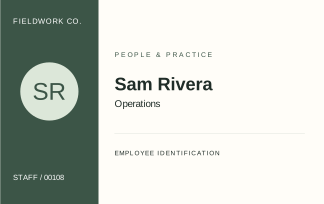
For a small team, an organisation name, person’s name, role and stable employee number are a useful starting point. Include a photo only if it helps people recognise the person. Avoid putting home addresses, dates of birth or other unnecessary personal details on a card.
Our fictional Fieldwork Co. sample separates the staff number from the name. The number stays consistent if the role changes; the printed role can then be updated without inventing a new identity record.
Build a roster you can reuse
Use one row per person. Keep employee numbers as text so a value such as 00042 does not become 42. Agree on department and role spelling before generating the batch.
The Android preview keeps local people records and supports a reusable team design. The website’s SVG files are a separate manual-editing option. Prepare bulk ID cards from an Excel or CSV roster
Replace one card without rebuilding the team
When someone changes role or loses a card, locate that person’s record, update the necessary details and review the new output. Keep the stable employee number unless your organisation’s own process requires a change.
For manually edited SVGs, save a clear master and a separate output file. Avoid sharing a folder full of unprotected staff photos or old exports more widely than needed.
Test the first print
Check long names, logo clarity and text contrast at the actual card size. Print a single sample at 100%, measure it, and check the holder fit before ordering stock or printing the whole team.
IDCardCo provides design resources and software previews. It does not manufacture or ship physical cards, authenticate employees or manage door access.