STUDENT & SCHOOL ID CARD TEMPLATE
A student ID card,
ready for your school.
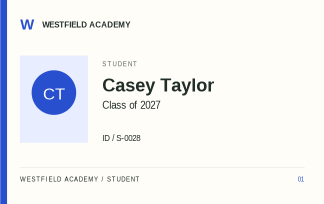
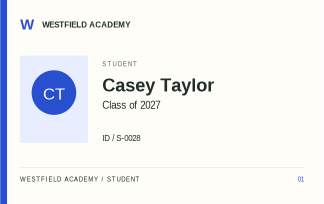
An editable student ID card template for cards issued by your school or institution. Add the school name, student name, class or year and student number. Keep sensitive information off the card.
FREE EDITABLE SVG · LANDSCAPE
Campus
A school-issued card layout with room for a class or year. All sample details are fictional.
- Card size
- 85.60 × 53.98 mm
- Fields
- Institution, Student name, Class or year, Student number
- Format
- Single front · SVG · editable text
Make this template yours.
- Open the SVG in a vector editor that supports text editing. Check that its fonts display correctly.
- Replace the fictional organisation, name and number. The monogram can stay, or you can replace it with a photo you have permission to use.
- Keep important text away from the trim edge. If your printer needs bleed, extend the background to the supplier’s specified bleed size.
- Export a PDF at the document’s original dimensions. Print one test and measure it before printing the full batch.
Our size guide explains pixels, trim and bleed. The print guide includes separate native-app sample sheets for calibration.
What should a student ID card include?
The Campus template starts with four editable text fields: institution, student name, class or year, and student number. Its photo area contains a fictional monogram. This is a single-sided school ID layout, with no barcode or back design included.
- Institution
- Replace “Westfield Academy” and the W monogram with your school’s name and an authorised logo. Check both the top and bottom name lines.
- Student name
- Replace “Casey Taylor” with the school’s chosen display name. Check a long name at the finished size before printing a batch.
- Class or year
- Use a consistent label such as “Year 10” or “Class of 2027”. Change the label when reissuing the card for a new school year.
- Student number
- Use the identifier supplied by the institution. Preserve leading zeros and avoid reusing another student’s number.
From an editable SVG to a printable school ID
Open the download in a vector editor with SVG text support, such as the free Inkscape. Save a copy before editing. Replace the fictional text and, if needed, place a permitted student photo in the existing photo area. Embed the photo in the document so it remains with the file when moved.
Keep the document at 85.60 × 53.98 mm. Export one card to PDF without scaling; use your editor’s page-layout tools to arrange copies on A4 or Letter. The SVG itself contains one front, not a sheet of cards. Our separate sample PDFs let you check printer scale before using your personalised artwork.
Include only information needed for the card’s purpose. A home address, date of birth, guardian contact details and medical information usually belong in the institution’s protected records, not on the printed face.
Before the school issues a card
- Have the institution check the name, student number, current year and logo.
- Inspect text contrast, photo clarity and holder fit on one actual-size print.
- Keep the editable master and student photos in a controlled location.
Acceptance for exams, discounts or access is decided by the organisation checking the card. This downloadable design cannot grant those privileges or replace an official credential.